I have put the old MegaFiers Playroom demo up finally. Click the link below to try it, again not much to do but look around and again you will need a good system as went mad with post effects etc. There are a few modifiers running in the scene, balloons are deformed in various ways, bend used on the projector slide, noise on a ball and path deform for the train. Cameras fly around on Mega Shapes etc.
Click Image to launch Demo
F1 to F4 changes camera modes, with mouse and WASDEC keys changing the position and direction, mouse wheel will zoom, F8 toggles dynamic curtains, and cursor keys will change the camera targets.

I have just submitted version 1.88 to the Asset store. This version sees major improvements to the FFD modifiers with up to 4 times speed increase as well as easier to use editing of the lattice points with position handles, size of handles and mirroring of the inputs. The FFD lattice will now fit around the current selection if there is one but if that is not desired you can select in the context menu to fit the lattice to the entire mesh.
The Copy Object system has been improved and you can now copy an object and all its children if you like via the GameObject menu options of Mega Copy Object or Mega Copy Hier, this makes creating copies of deformed objects a lot easier.
Other changes include morphs can now have channel values outside of 0 to 100 range, and rubber modifier allows for a another object to drive the effect. I have also added the beta of the Morph Link system which allows you to link morph channel percents to bone or object transforms, this makes things like muscle bulges very easy to do, you just add the component to an object and choose whether you want the morph driven from the rotation, position or scale and from which axis and choose the morph and channel to drive and that’s it, so if your animated character bends his elbow you can automatically have a bicep morph change, or setup a complete rig of controls to drive avatar systems etc. This is a work in progress so any ideas or suggestions please do share.
v1.88
Added an axis param to the Cylindrify modifier
CopyObject now copies MegaModifyObject params as well
FFD now has option for position handles instead of free handles for easier editing
FFD has a size option for handles
FFD has mirror x/y/z option to allow easier adjusting of lattice
Rubber modifier now has an option to pick a target transform to control the effect
Added color option to FFD Gizmo
Added undo for FFD lattice point move
Greatly improved performance of FFD modifiers
FFD will fit lattice to selection is present
Context menu item for fitting FFD to selection
Context menu item for fitting FFD to mesh
World Path Deform optimized
Copy Object no longer adds MegaModifyObject if not needed
Added Copy Object Hier to copy an object and all its children
Morph now supports values outside of 0 to 100 percent and respects Min and Max values
Beta of Morph Link system which allows morphs to be easily driven by other object positions or rotations so easy to drive a bicep muscle bulge from arm bone rotation for example
The sharp eyed may have noticed that there is now a simple forum added to the site so if you have any questions, suggestions, tips or anything to show off then please do use it. The link to the forum can be found on the left side bar.
Just done a few more tutorial videos, these cover Cylindrify, Noise and the powerful FFD set. The FFD set of modifiers has been rewritten and heavily optimized so now the FFD 4x4x4 runs 4 times faster for example, I have also added some editing tools such as mirror lattice point movements so editing shapes is easier, and added back in position handles. Other upcoming changes are improvements to the cyclindrify modifier and the Rubber modifier now allows you to pick which object to use to drive the simulation, this is handy for skinned meshes where the root node may not be the one with the mesh attached. More improvements and features are coming.
Click the image below to see the video.

This tutorial takes you through the features of the Bulge Modifier.
Click the image below to see the video.

This tutorial takes you through the features of the Stretch Modifier.
Click the image below to see the video.

This tutorial takes you through the features of the Bend Modifier.
Click the image below to see the video.

This tutorial shows you how you can attach objects of any kind to a MegaFiers deforming mesh in Unity3D. This means that it is now easy to attach objects such as other meshes, lights, particle systems to your deforming objects. You just need to use the helper system included in the latest release of MegaFiers.
Click the image below to see the video.

The latest version of MegaFiers v1.85 has just been submitted to the Asset Store this version brings two new beta modifiers in the dynamic water and the webcam displace modifiers. It also sees improvements to the Morph and Point Cache animation systems that now allow you to automatically sync the animations to the current playing Unity Animation clip. Some handy tools have also been added such as a Mesh Deep copy so you can create a new version of a mesh object and apply modifiers without it changing the original, and also a Copy Objects tool so if you have an object with a lot of modifiers on you can copy it using the new tool and have a totally separate entity, before the Unity mesh reference system would not allow you to do this. This will also be useful for users who have trouble with the prefab system and will allow them to work around duplicating an object in the scene with a function call.
Note, some files have been moved around in this update so if you get errors about duplicate classes remove the offending files from the MegaFier Test Scene/Scripts folder. You wont have any problems if it is a fresh import of the system into a new project etc.
I will be doing some videos to show off how to use the new features very soon.
v1.86
Added a public LoadFile() method to point cache editor to allow for files to be loaded via scripts.
Added a point cache instance script to allow for easy instancing of point cache objects without overheads of data storage.
Knot handles etc orientation bug fixed.
Physical UV generation works for shape meshes now.
Added linked update option to Morph Animator so can link moprh animation playback to current animation.
Added Play on Start option to Morph Animator.
Added beta version of dynamic Water modifier.
Added webcam version displacement modifier.
Added linked update option to Point Cache Animator so can link moprh animation playback to current animation.
Added Play on Start option to Point Cache Animator.
Added a Mega Copy Mesh so you can use a mesh with different modifiers on without altering the original mesh.
Check added to MegaShape DrawGizmo to limit number of segs used to display to avoid slowdown.
Number of channel Morph Anim helper supports increased to 20
Added MegaAttach system to allow objects to be linked to a point on a deforming objects surface.
Added a MegaCopyObject system to allow you to make copies of objects with ot without MegaFier components on that will work independently.
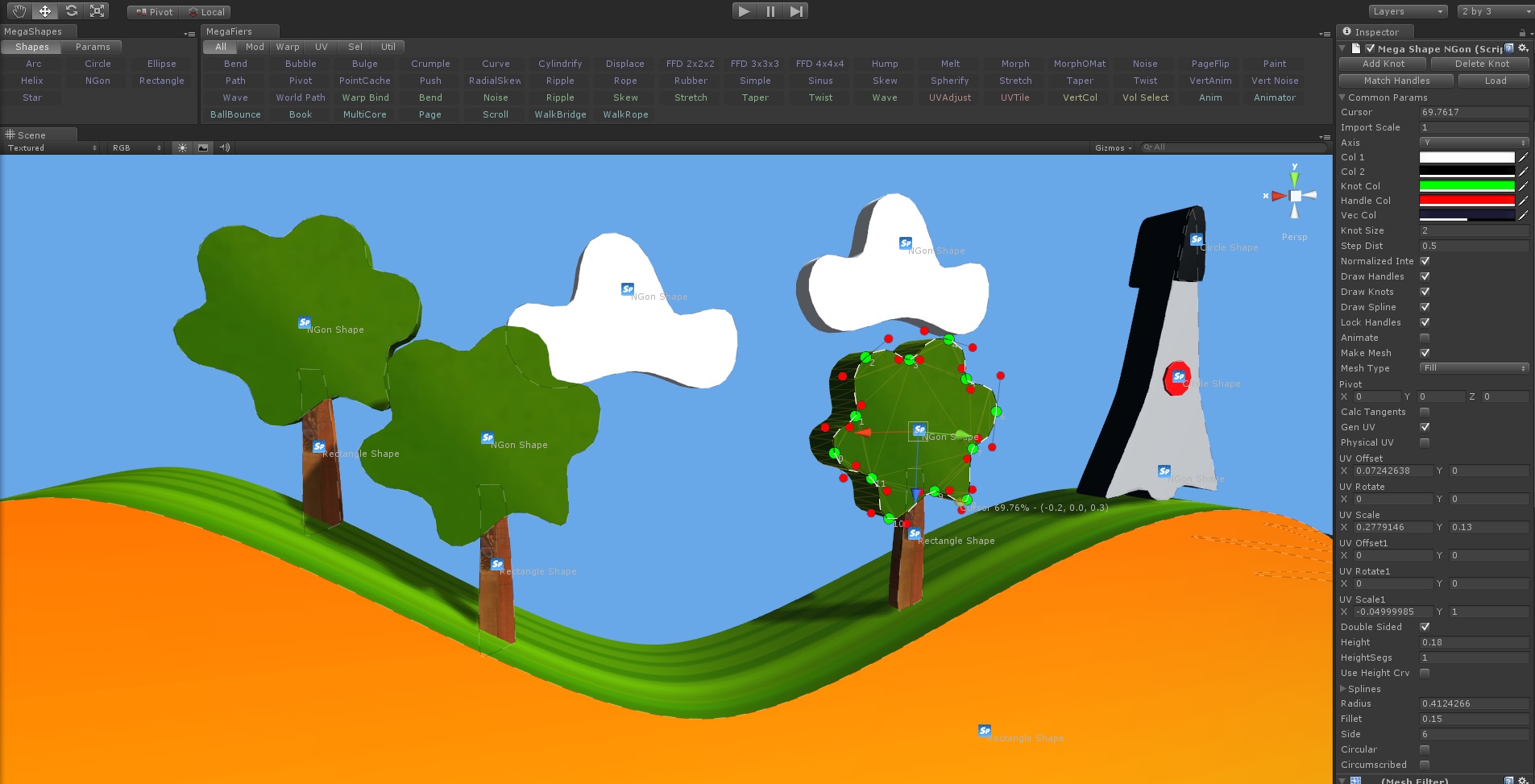
The MegaFlier Demo, click the image below to launch, Press H for help. Press Tab to lock the cursor so you can control the cameras, F1 to F4 changes the camera mode and cursor keys change the camera targets and the mouse will rotate the view in most modes. There isn’t much to do but look but it was a quick demo and is meant as a teaching aid not a full game demo. You will need a good system to run this with preferably Shader 3.0 support, it uses a few post process image effects and the particle system is quite hefty, so be warned.
The lighting in the demo is using the new Light Probe lighting with HDR and Tone mapping, and all the smoke trails etc are done with the new Shuriken particle system. The camera system is a custom system which allows for various transition modes, multiple targets and different styles of cameras. The demo currently has no MegaFier deformations as it meant as a blank canvas to be used to show what each modifier can do in turn in a series of video tutorials.
Click Image to launch demo

A little video showing the new demo scene for the upcoming MegaFier tutorial video series. All the models and artwork were done by Tony and coding by me. There will be a webplayer of this uploaded soon to play with.
Click the image below to see the video.

The final image before the little demo is uploaded 🙂

It’s almost done, almost time to do a video or two.

A little teaser pic taken from the new demo scene Tony and I have put together that will be used in the upcoming MegaFiers tutorial video series that will highlight each modifier and each param. Click the image for a larger version.

First test of a floating rigid body system linked to the Dynamic Water modifier in MegaFiers for Unity. Works quite nicely but I think I can improve things, but the Dynamic water modifier has a method to get the water height for a given point and methods for adding forces to the water, so anyone can code their own interaction scripts for the system.
Click the image below to see the video.

This is a quick demo of the dynamic water modifier soon to be added to the MegaFiers mesh deformation and animation system for Unity. You can draw disturbances onto the water with the mouse or by finger gestures or any other kind of input, you just need to call a method and provide an x and y position and a force and the system will do the rest. You can control the damping of the system, the input forces and the overall scale of the effect, as well as defining the size of the simulation grid.
The system will work on any mesh and any shape but best results are obtained with a mesh that has been regularly gridded up. The system runs nicely with the grid in the system using 6ms to run on a single core of a 2.8Ghz CPU.
The system supports obstructions and these can be drawn onto a grid and the level of obstruction can be defined per grid element.
Soon to be added will be support for floating rigid bodies as well defining varying amounts of damping in different areas.
Click the image below to see the video.

Version 1.85 is getting close to release. This version will include the Webcam version of the displacement modifier and also the Beta version of the Dynamic Water system. I have also extended the Morph and Point Cache Animator systems so they can be told to link to the main Unity animation. So if you change the Unity animation clip playing the morph and point cache animations will automatically match, so now you don’t need to script any changes to get morphs and point caches playing back. You just need to create the clips as before and setup the timings and check the Linked Update box.
I have also added a Mega Copy Mesh menu item to the Game Object menu, this will allow you to duplicate a mesh in the scene and break the instance connection so you can add different modifiers to it and not have it change the original.
v1.85
Added a public LoadFile() method to point cache editor to allow for files to be loaded via scripts.
Added a point cache instance script to allow for easy instancing of point cache objects without overheads of data storage.
Knot handles etc orientation bug fixed.
Physical UV generation works for shape meshes now.
Added linked update option to Morph Animator so can link moprh animation playback to current animation.
Added Play on Start option to Morph Animator.
Added beta version of dynamic Water modifier.
Added webcam version displacement modifier.
Added linked update option to Point Cache Animator so can link moprh animation playback to current animation.
Added Play on Start option to Point Cache Animator.
Added a Mega Copy Mesh so you can use a mesh with different modifiers on without altering the original mesh.
I have updated the MegaFiers exporter for Maya to now also export the BlendShape animation data. This now allows Maya users to take full advantage of Mayas animation systems to build their BlendShape animations and quickly and easily get those into Unity.
Click the image below to see the video.

This is version of two of the Dynamic water modifier, the physics has been optimized and the simulation core improved to give more control and a nicer simulation. Obstacle support has been added and the system will support dynamic obstacles and wake generation.
Click the image below to see the video.

This is the first test of a dynamic ripple/water modifier for the Unity3D MegaFiers system. This will allow interaction with the fluid from objects or external actions such as a finger gesture. This is just the first test, the quality and features will be improved and added to. Currently you can control the force with which you interact with the fluid, the number of elements making up the fluid sim, the damping and the wave height as well as the axis the wave moves on. The system will work with any shape mesh not just squares or rectangles. I plan on adding configurable barriers and a better wake simulation.
Click the image below to see the video.

A little video showing how the basic MegaShapes can be used to make meshes in Unity. Meshes can be constructed from splines and then be extruded to any height, the smoothness of the mesh can be adjusted as can all the uv mapping info. The splines can be edited and the mesh update in realtime, also the splines can be imported from 3DS Max and the system also supports animated meshes from max.
Click the image below to see the video.

Taylor Moore from http://www.veryseriousgames.com/ has just sent me a link to a very charming little test demo he has done using MegaFiers to drive the animations on his character. It makes use of a Bend and an animated Wave modifier to provide the motion to the character. Click the image below to launch the demo.

This is a quick video to show a very early test of some of the basic layers available in the Lofting system included in the MegaShapes package. The system allows for meshes to be created by lofting a cross section spline along a path spline, each loft can have multiple layers allowing you to build up complex meshes. The system will also allow multiple cross sections to be used as well as using meshes for example to build crash barriers along a lofted track.
Everything in the video is procedurally generated and the positions of fences or blocks etc can be altered in realtime, as well as the splines that make the cross sections or the paths making for some very interesting possibilities for game level design.
Click the image below to see the video.

MegaShapes is getting closer to release which means Tony is busy making it look nice, little teaser pic so fresh from his paint box the paints still wet.


I have been buys lately on extending the MegaShapes system ready to be released as it’s own product (MegaFiers will continue to include the basic version). The new MegaShapes will, like MegaFiers, expand over time to a complete system for all things spline or curve based, so such things as general spline code for path following complete with controller for moving objects along curves such as cameras, as well as an exporter for Max for getting your ready made shapes from there into Unity complete with their animations.
 MegaShapes will also include turning shapes into meshes with options for extruding the shape but the real power of the new system will come from the advanced systems such as the lofter. The lofter allows for you to use shapes together to create complex meshes, such things as tubes and racetracks. The lofting system makes use of a layer system so different lofts can be combined to create even more complex and useful meshes and various different types of layers are available such as the basic loft a shape a long another shape, or cloning of objects along a path to form fences or barriers, to complex lofts with any number of cross sections being allowed to give fine control over the mesh. And this combined with the ability to map layers such as the clone to other loft surfaces so objects are automatically aligned to the ground.
All the systems are fast enough to be updated at runtime for dynamic animated surfaces and this also allows for meshes to be generated at runtime with different params based on the power of the system your game is running on. And the amount of options provided for each layer gives you total control over all aspects of the generated meshes from vertex counts, to uv mapping, to alignment settings. I will be posting more info on this system as we get closer to release but to start you can view the very early development shots in this post to get a little idea about what is to come. Many more systems to add and new loft layers to do so keep checking back. Will be doing some videos soon and we are busy working on a fun little game that uses MegaShapes for its game levels, Tony has performed his magic again to really create something very special.

I have just submitted version 1.83 to the Asset store which sees a fair few changes and bug fixes, the list is below. There is a new modifier added called Squeeze, this is a work in progress modifier so is subject to change. The MegaShapes system has seen a make over and you can no triangulate your shapes and extrude them, more is coming on this system. Other new feature is the addition of helper windows for adding shapes or modifiers. More info on these features can be found in earlier posts on this blog page.
I have also bundled in the MegaGrab system as a belated Christmas present to users of the system you can find more info on the MegaGrab Page.
Complete list of changes for version 1.83 can be found below or on the Version History Page
v1.83
Vertical noise gizmo fixed to fit mesh correctly.
Vertical noise works correctly in multithreaded mode.
Noise modifier works correctly for multithreaded mode.
Fixed Rubber Modifier not using Enabled value
Added a cursor to the MegaShapes so you can create new knots in a more user friendly way
Added a findnearest point method to MegaShapes
Added MegaShapes window to GameObject menu for easier creation of splines
Added a MegaFiers Window for a simpler way to add components.
Improved the knot manipulation interface for MegaShapes, ie when dragging knots or handles they change values based on the dragplane of the current camera, ie if camera is pointing down dragging only happens on the x z plane.
Knotsize value changed to give larger useable range
You can now build meshed from your splines.
Added a height value to the MegaShape mesh builder to add depth to shapes.
UV support for megashape meshes
New Modifier added, Squeeze, beta
MegaGrab added to MegaFiers
A quick video of the boolean feature that will be in the upcoming MegaMesh system. It allows multiple meshes to be combined with the usual boolean operations of intersection, union and difference so you can punch holes in buildings or build complex shapes from simple primitives or whatever else grabs your fancy, it will even uv map the intersections for you. Still a few issues to iron out but it is very close now.
Click the image below to see the video.


Just getting the next release of MegaFiers together and thought I would put up a quick grab of a couple of new features of the new version, you can see there are now Windows for the MegaShapes and MegaFier systems to make adding bits easier, you also dont have to worry about adding a ModifyObject component first that will happen automatically when you add a Modifier.
 The MegaShape system has seen a bit of work as well with a new look to the spline knots and handles and a new system for editing the positions which make life a lot easier as well as a cursor based system for adding new knots just where you want them. Also you will see the new MegaShape mesher so you can turn your splines into meshes in different ways for example you can choose to build a line, or tubes or fill in the shape all with uv mapping options and numerous other options, this is a work in progress with a lot more features being added so get your requests in now.
 A sneak peek at my first experiments with using FumeFX with Unity, the flow lines seen in the image are real time flow lines around obstacles and make use of the data calculated by FumeFX to allow for very fast simulation in Unity of particles or whatever in a scene using a super fast custom physics solution. So for example if a car is driving along a leaf covered road the leaves could be made to react to the turbulence of the car, or a simulation of mountain updrafts and wind eddies could be used for a base jumping game, or a virtual wind tunnel could be simulated or for more normal uses such as smoke through contained volumes or tornado simulations.

I have just submitted version 1.82 to the Asset store, this version sees some general tidying up with more modifiers getting a makeover for their custom inspectors and also all modifiers should link to their correct help pages on the web site. I have also removed all errors for compiling to a Flash target but it seems the first release of 3.5 has a bug when serializing meshes so projects will build but until Unity do an update they wont run, all other targets aren’t effected. Other changes are the ability to set the detail level for the gizmos and an update to the book helper script to use local coords and rotations instead of world space values so you can position and rotate the completed book as you like and a fix to the Morph-O-Matic max exporter which fixes the non export of non triangle based meshes. More information can be found on the Version History page and be sure to check out the customer feedback page.

Just submitted version 1.78 to the Asset store. This version sees some tidying up the inspectors for the modifiers as well as relinking the help page for each modifier to the new website, and in case you didn’t know you can get help on part of the system by right clicking the Inspector title bar for the component and click ‘Help’ as seen in the picture, this will open your browser and show the help page for that item where you can see what all the params do and maybe see example videos or tips.

I also included the Beta versions of a couple of new modifiers, Curve Deform and Rope Deform. Curve Deform is a simple 2D deform based on a user defined curve, so this could be handy for putting humps in a snake or making a undulating piece of road as you can see in the picture (click to enlarge). This is a good alternative to the Path Deform modifier if your effect is only happening in one plane.

The other beta modifier added is an extension of the curve deform and is a something I call a Rope Deform, again it is a 2D curve based modifier but this time the curve shape is driven by a Verlet Physics system, so can be used for doing rope bridges or ropes or banners or anything where you want a droopy physics based effect. This modifier will be added to to allow adding of user defined constraints ie locking a points etc. Due to the system using a Verlet integrator the simulation is very stable and you can go from very stretchy to very very stiff with no issues. You have control over the number of masses in the systems and the stiffness of the system. Click the image to show the options on this modifier.
A demo of the chain and rope system that will become part of a new package soon. Click the image to start, Esc key will bring up a menu with a few options to play with, left and right buttons for moving around the scene and E & C to raise and lower the camera.

Start of vertex weighting added to MegaFiers.

Added a new physics based modifier that can do rope bridges and other such objects.